Colin's Radio Control

Follow on Facebook Follow on X Follow on Youtube Follow on Thingiverse Follow on Creality Cloud Chat on Discord

Advanced Search
  • Plan database
  • GPS
    • .3gpl to .kml converter
    • NMEA to .kml converter
  • Calculators
    • Weight converter
    • Multicalc
  • Manuals
    • Aeroplanes
    • Transmitters
    • Receivers
    • VTx
    • Other Electronics
    • Other
    • Action cameras
    • Batteries & Chargers
    • Coverings
    • Drones
    • Engines & Motors
    • ESCs
    • Flight Controllers
    • FPV cameras
    • FPV Goggles
    • GPS
    • Helicopters
  • FlyBack
  • Aeroplanes
    • Balsa
      • Eclipse
      • Exp 1R
      • Katana MX
      • Weekend Wren
      • Wot 4
      • Wot 4 mini
      • Yak 54
    • Foamies
      • Bixler 2
      • Bixler 3
      • Catalina (foamie)
      • Crack wing
      • Durafly Tundra
      • Firefly
      • FX-61 Phantom
      • Lidl Glider
      • Micro SU-27
      • Simples
      • T1 VTOL
      • UMX Slow Ultra Stick
      • UMX Ultrix
      • XBF 109
    • Carbon fibre
      • Mini Vapor
      • Night Vapor
    • BMFA
      • BMFA Dart
      • BMFA Rookie
      • Foamie glider
    • Projects
      • Catalina
      • Challenger
      • Clownfish
      • Mercury Matador
      • Printed wing
    • Retired
      • Crow
      • Cystalwing
      • Helium
      • Hunter SU-27
      • Piper J3 Cub
  • Cars
    • Tamiya Frog
    • Tamiya Grasshopper
    • FCX24M Range Rover
    • Retired
      • Graupner Impuls Sport
      • Himoto Viper
      • GV Rex-X
      • Mini Racer
  • Multi-rotor
    • Air 65 II
    • Air 75
    • Aquila 20 HD
    • Bashful
    • Blinky
    • Cetus
    • Cetus Pro
    • Clyde
    • Dragonfly 3
    • Dragonfly 4
    • Pokey
    • Sequre Bkli10
    • Shadow
    • Tunigy Micro X
    • Retired
      • Armor 85 HD
      • Dragonfly
      • Dragonfly 2
      • FQ777 Spider c126
      • Hummingbird
      • Inky
      • Mijia V666
      • Octopussy
      • Orson
      • Pinky
      • Test rig
      • Tricopter #1
      • Walkera QR Y-100
  • Hovercraft
    • Vectorcraft
    • Vectorcraft XL
    • Retired
  • Helicopters
    • Goosky S1
    • Graupner HeliMax 40
    • Gyroo
    • Mini Heli
    • Retired
      • MicroMold Lark 2
  1. You are here:  
  2. Home
  3. Electronics
  4. FPV

Navigation

  • Home
  • Gallery
  • Web links
  • Manufacturers
  • Classified ads
  • About me
  • Login

Downloads

  • BLHeli_32 music
  • LUA scripts
  • CAD
  • Build packs

Tools & machines

  • Laser cutter
  • 3D Printer

Components

  • Engines & motors
  • Electronics
  • Radio
  • Building materials

FPV

BetaFPV P1 OSD not displaying correctly (or at all) in iNav

I recently got a BetaFPV Aquila 20 HD kit, which included their VF04 HD goggles. I then purchased 2 P1 Air units to use on a tricopter and quadcopter, both running iNav 9.

In iNav I set the port to "MSP Display Port" and video format to "AVATAR" according to the instructions.However, there was no OSD display showing the goggles. I checked everyting (wires connected correctly etc.). Eventually I found that if I set the port to "Furious FTP VTx", rebooted and then changed it to "MSP Display port", I did get some OSD, though the different items (battery voltage, Craft name etc.) kept blinking off and on. Also the display was showing strange characters instead of the proper ones (e.g. the icon for the battery voltage, horizon line etc.)

I also noticed that the firmware version was 1.0.36 for both the goggles and VTx (the current version at the time of writing is 2.0.6).

Upgrading the firmware and changing some settings solved the problem.

As version 2,x is not compatible with version 1.x and you have to upgrade to 1.0.44 before going to 2.0.6, I had to perform the following steps:

  1. Upgrade the firmware on the goggles to 1.0.44
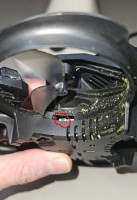
  2. Rebind each VTx and flash it to 1.0.44 (note, the bind button for the VTx on the Aquila 20 HD drone is accessed through the slot at the front starboard propeller (see photo))
  3. Rebind each VTx and flash it to 2.0.6
  4. Flash the goggles to 2.0.6
  5. Rebind each VTx

Aquila 20 HD VTx bind button.

Aquila 20 HD VTx bind button


To resolve the strange characters problem, I tried each of the video modes and found that "BFHDCOMPAT" gave the best result.

Note: the port should still be set to MSP Display port.

Published: 23 May 2026
Hits: 288

Subcategories

Goggles, monitors & receivers Article Count:  0

Cameras Article Count:  0

VTx Article Count:  0

RSS
Copyright © 2026 Colin's Radio Control. All Rights Reserved.
Joomla! is Free Software released under the GNU General Public License.